Desk Accessories · Domechy
Free Capybara Pen Holder 3D Model
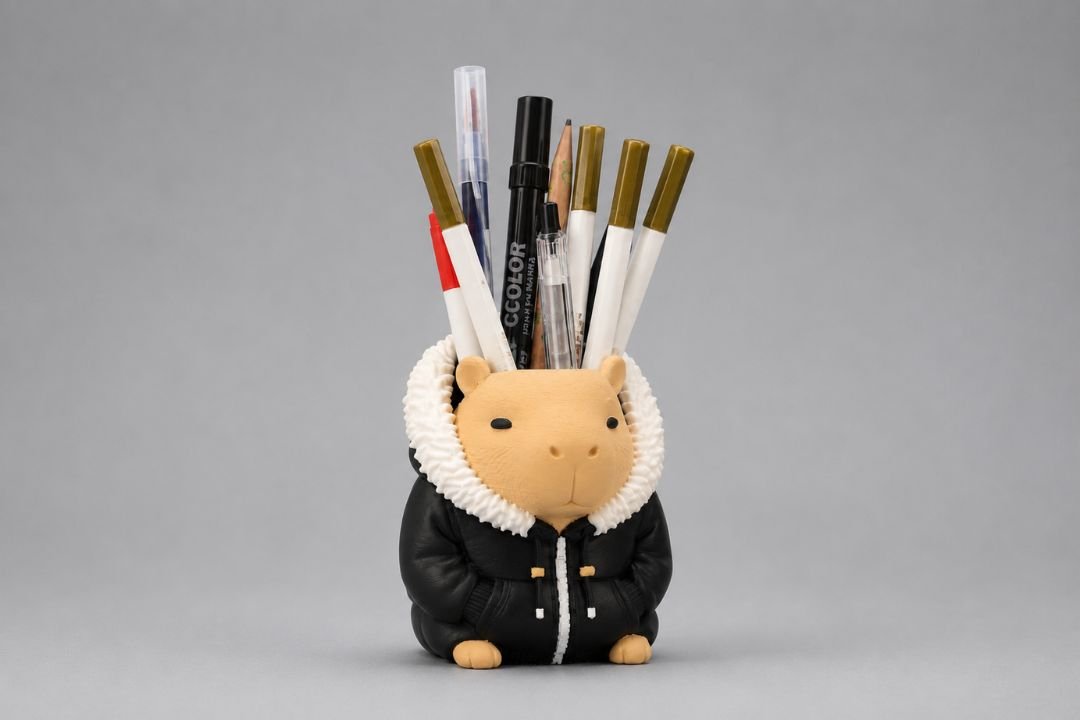
A capybara dressed in a puffer jacket with a hollow top for holding pens, pencils and markers. Print it in three colors or paint it after — the choice is yours.
Delivered via Payhip. Your email may be used for occasional Domechy updates. Unsubscribe anytime.
About the Capybara Pen Holder
A desk organiser with personality.
This capybara pen holder is a functional desk organiser shaped like a capybara wearing a black puffer jacket with a white fur-trimmed collar. The hollow body holds pens, pencils and markers upright — it is a practical print that also doubles as a desk decor piece.
The model is designed for FDM printing. Three color regions — tan body, black jacket, white fur collar — work well with an AMS or MMU system, or can be achieved with filament swaps. Single-color prints also look good with a bit of hand-painting afterwards.
STL file
Universal format for single-color or manually-painted prints.
3MF file
Recommended for multicolor printing. Color regions pre-assigned and ready to load in your slicer.
Personal use licence
Free for personal printing and gifting. Commercial use is not permitted under the standard licence.
Recommended Print Settings
Tree support is required. Prints upright.
| Model Type | Desk organiser / pen holder |
| File Formats | STL and 3MF |
| Printer Type | FDM recommended |
| Layer Height | 0.16 mm (0.12 mm for better fur detail) |
| Infill | 15–20% |
| Supports | Tree support is required |
| Wall Count | 3 walls for a sturdy holder |
| Difficulty | Easy to Intermediate |
| Commercial Use | Not permitted — personal use only |
Multicolor Tips
- Use the 3MF file — three color regions are pre-assigned and load automatically in Bambu Studio and PrusaSlicer.
- Suggested filaments: tan or beige for the body, matte black for the jacket, white or cream for the fur collar.
- For filament swap: use your slicer’s pause-at-layer feature at the boundary between each color region.
- Single-color prints work well with hand-painting. Apply grey primer first for best acrylic adhesion.
Printed Result
How it looks off the printer.
Suggested Printing Workflow
From download to desk.
Download and extract the ZIP
You will find the STL and 3MF files along with a README and LICENSE file.
Open the 3MF in your slicer
Drag the 3MF into Bambu Studio or PrusaSlicer. The three color regions load automatically — assign each to your loaded filament.
Slice and print upright
Tree support is required. Print with the flat base on the build plate. 3 walls and 15–20% infill is enough for a solid, functional holder.
Post-process if single-color
Light sanding on the fur collar area improves texture. Apply grey primer, then base coat with acrylics. Finish with a matte varnish to protect the paint.
Licence and Usage Terms
Free for personal use. Not for commercial sale.
This model is released under a personal use licence. You are free to print it for yourself, give printed copies as gifts, or use it as a display piece. You may not sell printed copies, use the model in commercial projects, or redistribute the files on other platforms without written permission from Domechy.
Licence Summary
- Personal printing and gifting — permitted.
- Selling printed copies — not permitted.
- Redistributing or re-uploading the files — not permitted.
- Commercial use requires a separate written licence from Domechy. Contact us for enquiries.
Pingback: Hi3D Review: Can AI-Generated 3D Models Be Used for 3D Printing? | Domechy