

As some of you may already know, this printer has not been released yet. So this article is based on Creality’s own K3 product page, which went live on 4 September 2026, not on personal experience using the machine.
What I want to do here is set out what the update actually added, since this is the first time the K3 has appeared with a real specification sheet rather than marketing copy about the nozzle changer inside it, and then check the two headline claims against the data Creality published on the same page.
What Creality released on 4 September
The K3 moved from a teaser campaign to a full product page, and Creality promoted it to New Flagship in the site navigation under the tagline “Beyond Nozzles. Conquer Materials.” Build volume, weight, temperatures, camera resolution, storage, material compatibility and power draw are all listed for the first time, alongside four benchmark comparisons using named models and a compatibility table that separates the base machine from its optional kits.
The date lines up with IFA Berlin, which opened on 4 September, and Creality used the opening day of IFA 2025 to announce the K2 Pro. The page also carries a K3 giveaway that closes on 9 September.
The new images and the CFS accessories
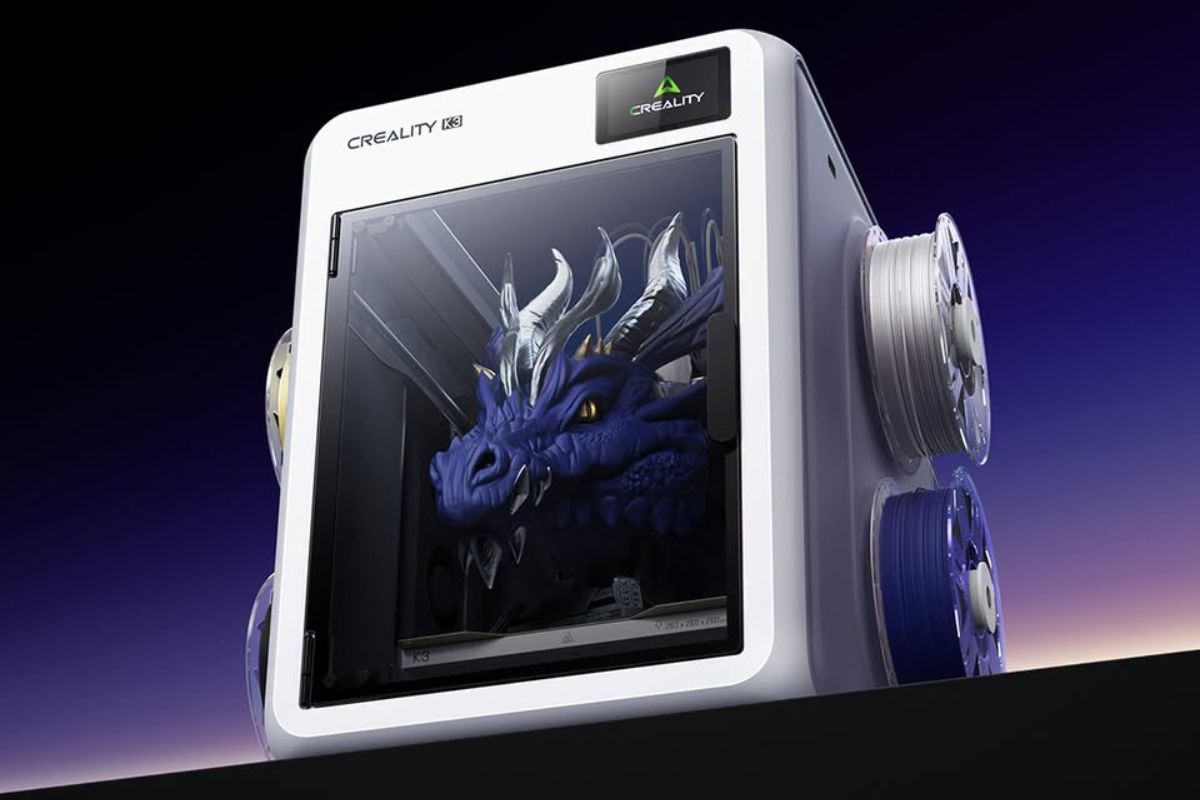
The update also brought the first production-style images of the machine, which is what most people noticed before anyone read the specification sheet.
The page’s own K3 and Accessories section names four items alongside the printer: CFS Flex, CFS Hub, CFS Hood and a CMYK Filament Bundle. Creality has not explained what any of them do, and no prices are listed. The specification sheet lists four filament slots and no external feeder, so exactly how the CFS hardware attaches to the K3 has not been described.
The published spec sheet
| Spec | Creality K3 |
|---|---|
| Build volume | 260 x 260 x 260 mm |
| Printer dimensions | 420 x 482 x 536 mm |
| Net weight | 22 kg |
| Max print speed | 500 mm/s |
| Max acceleration | 20,000 mm/s² |
| Layer height | 0.08 to 0.35 mm on a 0.4 mm nozzle |
| Hotend max temp | 300 °C |
| Heated bed max | 100 °C |
| Extruder | Hardened steel gear direct drive, step-servo |
| Max nozzles | 4 |
| Nozzle change time | 4.8 seconds (claimed) |
| Material change time | 15 seconds (claimed) |
| Nozzle diameters | 0.2, 0.4, 0.6 and 0.8 mm |
| Filament slots | 4, 1.75 mm, 1 kg spools |
| Build plate | PEI spring steel |
| Display | 3.97 inch touchscreen |
| Camera | 720p with lighting |
| Storage | 8 GB |
| Connectivity | 2.4 GHz Wi-Fi, USB drive, Creality Cloud |
| Rated power | 480 W at 100 to 127 V, 950 W at 200 to 240 V |
| Slicer | Creality Print 7.0 or newer |
Anyone coming from a K2 Plus will notice the size first. A 260 mm cube is smaller than most people expected from a flagship, and there is no heated chamber on the base machine, so the K3 is clearly not competing on build volume.
The four-nozzle system and the 4.8 second change
Creality describes KliTek as an independent four-channel, four-nozzle architecture, where each filament keeps its own channel and its own nozzle assembly and the printer swaps between them during a print. The nozzle change time is now specified as 4.8 seconds, replacing the earlier “under five seconds” wording. Creality also lists a separate 15 second material change time.
What moves is the nozzle assembly rather than a complete toolhead. It holds the nozzle, hotend and filament tube, weighs roughly a fifth of a full toolhead, and the assembly is secured with two screws and uses a USB-C connection. Because the carriage has to dock and realign every time it swaps, Creality quotes repositioning accuracy of under 25 microns.
Creality’s own benchmark data
The headline numbers are up to 80% less print time and up to 85% less filament, both measured against a single-channel, single-nozzle printer and both for a print using four colours or fewer. Alongside those claims Creality published four worked examples using models from STLFLIX, which is considerably more detail than the earlier campaign page offered with its single 39 g against 278 g bar chart.
| Model | Changes | Print time, K3 vs single nozzle | Waste, K3 vs single nozzle |
|---|---|---|---|
| Chivalry Thirst Quencher | 1,358 | 24h 53m vs 90h 00m | 125 g vs 1,608 g |
| Titan Dragon Trophy | 3,494 | 42h 26m vs 168h 39m | 240 g vs 2,417 g |
| Naja Incense Holder | 821 | 14h 56m vs 34h 25m | 53 g vs 167 g |
| Gargoyle’s Roost Dice Tower | 1,182 | 72h 23m vs 104h 47m | 92 g vs 502 g |
All four sets of figures come from Creality Lab, and nobody outside the company has measured any of it yet.
Do the 80% and 85% claims hold
Creality published both the claims and the numbers behind them, so the two can be compared directly.
| Model | Print time saved | Filament saved |
|---|---|---|
| Chivalry Thirst Quencher | 72% | 92% |
| Titan Dragon Trophy | 75% | 90% |
| Naja Incense Holder | 57% | 68% |
| Gargoyle’s Roost Dice Tower | 31% | 82% |
The 80% print time headline does not appear in any of the four. Filament comes out closer, with two of the four above the 85% claim and two below it.
Creality does say “up to”, which keeps the claim defensible, although the spread is wide enough to need explaining. The dice tower has 1,182 nozzle changes and saves 31% of print time while the Chivalry model has 1,358 changes and saves 72%, so the number of colour changes on its own predicts very little. What matters more is the geometry of the model and how much printing happens between each change. On models that are mostly one colour with a few accents, expect results near the bottom of that range.
What is included and what is sold separately
The details that decide this sit in the footnotes and the compatibility table rather than in the large type.
The K3 ships with 0.4 mm nozzles, and mixing diameters needs the multi-nozzle kit, which Creality states is sold separately. The base K3 supports TPU 95A, while softer TPU such as 90A and 85A requires the optional Multi-Material Kit.
Material compatibility is listed in three tiers, and what separates them is hardware you have to buy.
| Configuration | Materials |
|---|---|
| K3 as shipped | PLA, PETG, PET, PLA-CF/GF, PETG-CF/GF, PCTG, TPU 95A |
| With top cover | All of the above plus ABS, ASA, ASA-CF, PP, PC, PA, PA-CF, PP-CF/GF |
| With Multi-Material Kit | All of the above plus BVOH, PVA, TPE, TPU 90A and 85A |
The base K3 already supports several common rigid materials and TPU 95A, while engineering materials, softer TPU and some of the headline capabilities require optional hardware. Creality states all of this openly, but until there is a price for the base machine and for each kit, nobody can work out what the complete system costs.
Earlier KliTek material mentioned TPU as soft as 80A, while the new K3 specification lists support down to 85A through the optional Multi-Material Kit. For this article we are treating the newer K3 specification as the current figure.
Mixed nozzle sizes and multi-material printing
The four nozzle positions do not have to run the same diameter, which is the more interesting use of the system. Creality lists 0.2, 0.4, 0.6 and 0.8 mm, and claims that pairing a 0.4 mm nozzle for outer walls with a 0.8 mm nozzle for infill lifts efficiency by up to 30%.
The same independence applies to materials. Creality is showing PLA models with PETG as a breakaway support interface, and the reverse, which works because the two do not bond strongly to each other. Separate nozzle paths avoid the repeated purging a single-nozzle system needs to reduce cross-contamination between materials.
For colour, Creality is showing CMYK printing that reaches around 25 colours from four filaments by controlling layer thickness and ratios and letting filament translucency blend the result. The page adds its own limitation, that this is not precise colour matching and cannot reproduce every specified colour.
Sensors, camera and failure detection
Creality lists a network of 37 sensors on the K3, which supports the auto-calibration that keeps repeated nozzle swaps accurate. The listed detection features cover build plate presence, air printing, nozzle clogging, hotend presence, filament runout and tangle, plus nozzle offset and flow rate calibration.
The AI camera handles three checks. Before printing it looks for a missing build plate and for models or foreign objects left on the bed from an earlier job. During printing it watches for spaghetti and pauses automatically. The camera itself is 720p, which is fairly low resolution for that kind of work.
Native root access confirmed
Creality now explicitly states that the K3 includes native Root access integration, which had not been confirmed before this page went live. Exactly how unrestricted that access will be should become clearer once production machines reach users.
What is still unknown
There is no retail price in any currency, no order date and no ship date, and Creality has not said whether the K3 launches as a bare printer, a combo, or both. The prices of the multi-nozzle kit, the TPU accessories, the top cover, the Multi-Material Kit and the three CFS accessories are all unlisted, and so is the cost of a replacement nozzle assembly, which matters because that is the part you will eventually have to replace.
The 80,000 swap cycle durability figure that has circulated since June does not appear on the product page, so I would treat it as unconfirmed.
Is it worth waiting for
If you print multicolour regularly and purge waste is your main frustration, the four-channel architecture is aimed directly at your problem, and the filament reduction across all four of Creality’s test models is the most consistent thing on the page. Joining the update list costs nothing, but I would wait for independent testing before committing money to a mechanism this new. A nozzle changer has to stay accurate not just for a demonstration print, but after thousands of swaps over months of use, and no specification sheet answers that.
If you mostly print in a single colour, KliTek alone probably isn’t a strong reason to wait.
The one number that decides all of this is still missing. The base machine is a 260 mm cube running four channels of common rigid materials and TPU 95A, and reaching everything shown in the marketing means buying kits that have no announced price either. Until Creality publishes those figures, the specifications are the whole story.
Sources
- Creality K3 official product page
- Creality KliTek campaign page
- Q&A for Creality’s KliTek, the next-gen nozzle changer, Creality official
- Creality Reveals New KliTek Details Ahead of the Fall 2026 Launch, Fabbaloo
- Creality’s Next Generation of 3D Printer to Be a KliTek-Powered Toolchanger, All3DP
Don’t miss the latest articles and guides
Get new Domechy articles, guides and free models straight to your inbox.

Wanna share your thoughts or request anything? Comment below.