
In FDM 3D printing, the top surface often shows visible layer lines — especially when using a larger nozzle or thicker layer height. For aesthetic prints like display parts or enclosures, these lines can make the model look unfinished.
Solution: Use Ironing
Ironing is a slicer feature that smooths the top surface by moving the nozzle slowly over it while extruding a very small amount of filament. This process fills the small gaps between lines, creating a more uniform and glossy finish.
It takes longer to print, but the surface quality improves significantly.
How to Enable Ironing in Bambu Studio
1.Select the model you want to apply ironing to.
2.Open the Quality tab.
3.Scroll down to find Ironing (default is No Ironing).
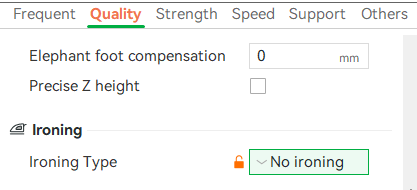
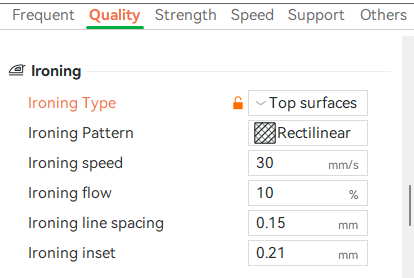
4. Click it and choose Top Surface (the most common option, but you can choose others based on your preferences).
5. Slice and print as usual.
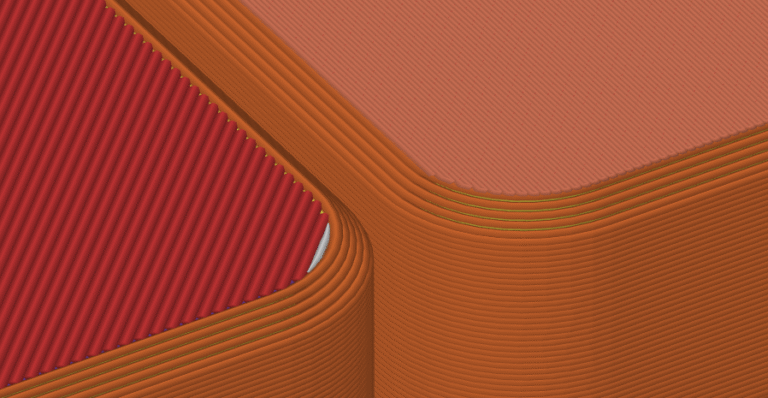
Result Comparison
-
Left: Without Ironing — visible, wide top lines.
-
Right: With Ironing — finer, smoother surface lines.
The difference is clearly visible on the final print: the ironed surface feels smooth to touch and looks more professional, ideal for decorative or presentation pieces.
Don’t miss the latest articles and guides
Get new Domechy articles, guides and free models straight to your inbox.

Wanna share your thoughts or request anything? Comment below.